
Does my website need an SSL certificate?

Toy stormtrooper next to laptop

Photo by Liam Tucker on Unsplash.

Yes, it does! Read on to find out why you need an SSL certificate on your website.

Google and its Chrome browser will be flagging websites as non-secure in the next few weeks if you don't have an SSL certificate. In fact, Google has already been doing this for a while on pages containing login forms. However, the big change is that all pages will be flagged as non-secure in Google Chrome 68 (due soon).

Google will be doing this by adding a Not Secure status to the address bar.
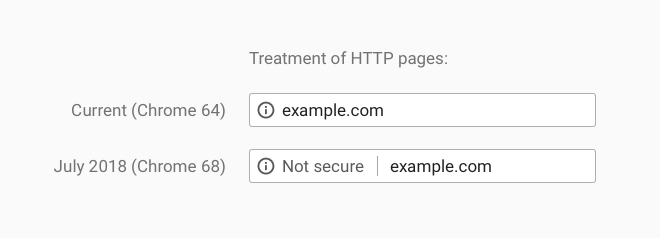
Screenshot showing how Google denotes non-SSL sites

An SSL certificate means that the connection between your browser and the web server (which displays the website) is encrypted and secure. You can see this status in browsers which show a (green) padlock symbol in the address bar. And if you look more closely at website URLs, all sites that use an SSL certificate have a website URL that begins with https:// and not http://.

Google already gives a rankings boost (in search results) to websites that operate under the https method with an SSL certificate. I'm not sure how much of a boost but any increase in ranking signals is worthwhile.

There is another reason why your site should have an SSL certificate and that is user trust. The Not Secure warning from Google will deter some website visitors and I expect all sites without SSL to lose visitors over the next year as a result of this.

Many sites have installed an SSL certificate (and you may already have this if you are a shop taking payments online). However, many sites do not operate under SSL/https and now is the time to make that change.

What Should I Do?

Talk to your web hosting company about installing a certificate on your domain. Some will charge for this but Let's Encrypt is an open source and free certificate provider and that's what I recommend. There's really no need to pay for a certificate in most cases. If Let's Encrypt is available on your web host, that's what I would choose.

There's really no need to pay for a certificate in most cases

After that, talk with your web developer about moving your website to the https/SSL protocol. All content on your website will need to be served using the https:// method. The work required here depends on the site but it can be done on most sites within a couple of hours with 301 redirects from http:// to https:// and with changes to internal site URLs. And systems like WordPress have plugins like Really Simple SSL that make the process relatively straightforward.

Tell Google and check your site

Now, let Google know about the change by resubmitting your sitemap and by adding the https:// version of the site in Google Search Console. Your web developer will be able to do this.

Keep monitoring your site but you should be able to see the padlock symbol on all pages. Check your pages for mixed content warnings in the browser address bar (where some of the pages have content from the non-https site). Ask your website developer to fix these.

You should be able to see the padlock symbol on all pages

Make sure that any links on your site uses the https:// structure from now on. In many cases, the site URLs will adapt to the new https:// method if the site and its content management system are coded appropriately.

Smile! The work is done. Your website is more secure and Google will love you forever! Well, perhaps not! but an SSL certificate is definitely needed for a site on the web today. I expect all sites to be operating this way within a year or two.

Contact me if you need help with your website.

IDValue
url_0/news/2018-07-19-does-my-website-need-an-ssl-certificate
url_s2018-07-19-does-my-website-need-an-ssl-certificate
url_12018-07-19-does-my-website-need-an-ssl-certificate
perch_page_path/news/post
longerTitleDoes my website need an SSL certificate?
image/perch/resources/toy-stormtrooper-guarding-laptop.jpg
imageDescriptionToy stormtrooper next to laptop
show1
alternativeimage
alternativeimageDescription
excerpt

Yes, it does! Read on to find out why you need an SSL certificate on your website.

pageDescriptionYes, it does! Read on to find out why you need an SSL certificate on your website.
categories
Array
(
    [0] => 14
)
og_titleDoes my website need an SSL certificate?
og_descriptionYes, it does! Read on to find out why you need an SSL certificate on your website.
og_image/perch/resources/toy-stormtrooper-guarding-laptop.jpg
og_typearticle
_blocks
Array
(
    [0] => Array
        (
            [hideimageforamp] => 1
            [normalimage2] => Array
                (
                    [assetID] => 837
                    [title] => Treatment of HTTP Pages@1x 2
                    [_default] => /perch/resources/treatment-of-http-pages1x-2.png
                    [bucket] => default
                    [path] => treatment-of-http-pages1x-2.png
                    [size] => 16010
                    [w] => 660
                    [h] => 238
                    [mime] => image/png
                    [sizes] => Array
                        (
                            [thumb] => Array
                                (
                                    [w] => 150
                                    [h] => 54
                                    [target_w] => 150
                                    [target_h] => 150
                                    [density] => 2
                                    [path] => treatment-of-http-pages1x-2-thumb@2x.png
                                    [size] => 10671
                                    [mime] => image/png
                                    [assetID] => 838
                                )

                        )

                )

            [normalimageDescription2] => Screenshot showing how Google denotes non-SSL sites
            [_block_type] => image3
            [_block_id] => pe2nbw
            [_block_index] => 0
        )

    [1] => Array
        (
            [posttext] => Array
                (
                    [_flang] => html
                    [raw] => 

An SSL certificate means that the connection between your browser and the web server (which displays the website) is encrypted and secure. You can see this status in browsers which show a (green) padlock symbol in the address bar. And if you look more closely at website URLs, all sites that use an SSL certificate have a website URL that begins with https:// and not http://.

Google already gives a rankings boost (in search results) to websites that operate under the https method with an SSL certificate. I'm not sure how much of a boost but any increase in ranking signals is worthwhile.

There is another reason why your site should have an SSL certificate and that is user trust. The Not Secure warning from Google will deter some website visitors and I expect all sites without SSL to lose visitors over the next year as a result of this.

Many sites have installed an SSL certificate (and you may already have this if you are a shop taking payments online). However, many sites do not operate under SSL/https and now is the time to make that change.

What Should I Do?

Talk to your web hosting company about installing a certificate on your domain. Some will charge for this but Let's Encrypt is an open source and free certificate provider and that's what I recommend. There's really no need to pay for a certificate in most cases. If Let's Encrypt is available on your web host, that's what I would choose.

There's really no need to pay for a certificate in most cases

After that, talk with your web developer about moving your website to the https/SSL protocol. All content on your website will need to be served using the https:// method. The work required here depends on the site but it can be done on most sites within a couple of hours with 301 redirects from http:// to https:// and with changes to internal site URLs. And systems like WordPress have plugins like Really Simple SSL that make the process relatively straightforward.

Tell Google and check your site

Now, let Google know about the change by resubmitting your sitemap and by adding the https:// version of the site in Google Search Console. Your web developer will be able to do this.

Keep monitoring your site but you should be able to see the padlock symbol on all pages. Check your pages for mixed content warnings in the browser address bar (where some of the pages have content from the non-https site). Ask your website developer to fix these.

You should be able to see the padlock symbol on all pages

Make sure that any links on your site uses the https:// structure from now on. In many cases, the site URLs will adapt to the new https:// method if the site and its content management system are coded appropriately.

Smile! The work is done. Your website is more secure and Google will love you forever! Well, perhaps not! but an SSL certificate is definitely needed for a site on the web today. I expect all sites to be operating this way within a year or two.

Contact me if you need help with your website.

[processed] =>

An SSL certificate means that the connection between your browser and the web server (which displays the website) is encrypted and secure. You can see this status in browsers which show a (green) padlock symbol in the address bar. And if you look more closely at website URLs, all sites that use an SSL certificate have a website URL that begins with https:// and not http://.

Google already gives a rankings boost (in search results) to websites that operate under the https method with an SSL certificate. I'm not sure how much of a boost but any increase in ranking signals is worthwhile.

There is another reason why your site should have an SSL certificate and that is user trust. The Not Secure warning from Google will deter some website visitors and I expect all sites without SSL to lose visitors over the next year as a result of this.

Many sites have installed an SSL certificate (and you may already have this if you are a shop taking payments online). However, many sites do not operate under SSL/https and now is the time to make that change.

What Should I Do?

Talk to your web hosting company about installing a certificate on your domain. Some will charge for this but Let's Encrypt is an open source and free certificate provider and that's what I recommend. There's really no need to pay for a certificate in most cases. If Let's Encrypt is available on your web host, that's what I would choose.

There's really no need to pay for a certificate in most cases

After that, talk with your web developer about moving your website to the https/SSL protocol. All content on your website will need to be served using the https:// method. The work required here depends on the site but it can be done on most sites within a couple of hours with 301 redirects from http:// to https:// and with changes to internal site URLs. And systems like WordPress have plugins like Really Simple SSL that make the process relatively straightforward.

Tell Google and check your site

Now, let Google know about the change by resubmitting your sitemap and by adding the https:// version of the site in Google Search Console. Your web developer will be able to do this.

Keep monitoring your site but you should be able to see the padlock symbol on all pages. Check your pages for mixed content warnings in the browser address bar (where some of the pages have content from the non-https site). Ask your website developer to fix these.

You should be able to see the padlock symbol on all pages

Make sure that any links on your site uses the https:// structure from now on. In many cases, the site URLs will adapt to the new https:// method if the site and its content management system are coded appropriately.

Smile! The work is done. Your website is more secure and Google will love you forever! Well, perhaps not! but an SSL certificate is definitely needed for a site on the web today. I expect all sites to be operating this way within a year or two.

Contact me if you need help with your website.

) [_block_type] => textblock [_block_id] => pe2n9y [_block_index] => 1 ) )
itemID69
postID69
blogID1
postTitleDoes my website need an SSL certificate?
postSlug2018-07-19-does-my-website-need-an-ssl-certificate
postDateTime2018-07-19 09:50:00
postDescRawPhoto by Liam Tucker on Unsplash. Yes, it does! Read on to find out why you need an SSL{...}
postDescHTMLPhoto by Liam Tucker on Unsplash. Yes, it does! Read on to find out why you need an SSL{...}
postDynamicFields{"longerTitle":"Does my website need an SSL certificate?","image":{"assetID":"835","title":"Toy{...}
postTags
postStatusPublished
authorID1
sectionID1
postCommentCount1
postImportID
postLegacyURL
postAllowComments1
postTemplatepost.html
postMetaTemplatepost_meta.html
postIsPublished1
sortval69
pagingfalse
total1
number_of_pages1
total_pages1
per_page10
current_page1
lower_bound1
upper_bound1
prev_url
next_url
prev_page_number
next_page_number
first_page_url/news/2018-07-19-does-my-website-need-an-ssl-certificate
last_page_url/news/2018-07-19-does-my-website-need-an-ssl-certificate
first_pagetrue
last_pagetrue
perch_longerTitleDoes my website need an SSL certificate?
perch_image/perch/resources/toy-stormtrooper-guarding-laptop.jpg
perch_imageDescriptionToy stormtrooper next to laptop
perch_show1
perch_alternativeimage
perch_alternativeimageDescription
perch_excerpt

Yes, it does! Read on to find out why you need an SSL certificate on your website.

perch_pageDescriptionYes, it does! Read on to find out why you need an SSL certificate on your website.
perch_categories
Array
(
    [0] => 14
)
perch_og_titleDoes my website need an SSL certificate?
perch_og_descriptionYes, it does! Read on to find out why you need an SSL certificate on your website.
perch_og_image/perch/resources/toy-stormtrooper-guarding-laptop.jpg
perch_og_typearticle
perch__blocks
Array
(
    [0] => Array
        (
            [hideimageforamp] => 1
            [normalimage2] => Array
                (
                    [assetID] => 837
                    [title] => Treatment of HTTP Pages@1x 2
                    [_default] => /perch/resources/treatment-of-http-pages1x-2.png
                    [bucket] => default
                    [path] => treatment-of-http-pages1x-2.png
                    [size] => 16010
                    [w] => 660
                    [h] => 238
                    [mime] => image/png
                    [sizes] => Array
                        (
                            [thumb] => Array
                                (
                                    [w] => 150
                                    [h] => 54
                                    [target_w] => 150
                                    [target_h] => 150
                                    [density] => 2
                                    [path] => treatment-of-http-pages1x-2-thumb@2x.png
                                    [size] => 10671
                                    [mime] => image/png
                                    [assetID] => 838
                                )

                        )

                )

            [normalimageDescription2] => Screenshot showing how Google denotes non-SSL sites
            [_block_type] => image3
            [_block_id] => pe2nbw
            [_block_index] => 0
        )

    [1] => Array
        (
            [posttext] => Array
                (
                    [_flang] => html
                    [raw] => 

An SSL certificate means that the connection between your browser and the web server (which displays the website) is encrypted and secure. You can see this status in browsers which show a (green) padlock symbol in the address bar. And if you look more closely at website URLs, all sites that use an SSL certificate have a website URL that begins with https:// and not http://.

Google already gives a rankings boost (in search results) to websites that operate under the https method with an SSL certificate. I'm not sure how much of a boost but any increase in ranking signals is worthwhile.

There is another reason why your site should have an SSL certificate and that is user trust. The Not Secure warning from Google will deter some website visitors and I expect all sites without SSL to lose visitors over the next year as a result of this.

Many sites have installed an SSL certificate (and you may already have this if you are a shop taking payments online). However, many sites do not operate under SSL/https and now is the time to make that change.

What Should I Do?

Talk to your web hosting company about installing a certificate on your domain. Some will charge for this but Let's Encrypt is an open source and free certificate provider and that's what I recommend. There's really no need to pay for a certificate in most cases. If Let's Encrypt is available on your web host, that's what I would choose.

There's really no need to pay for a certificate in most cases

After that, talk with your web developer about moving your website to the https/SSL protocol. All content on your website will need to be served using the https:// method. The work required here depends on the site but it can be done on most sites within a couple of hours with 301 redirects from http:// to https:// and with changes to internal site URLs. And systems like WordPress have plugins like Really Simple SSL that make the process relatively straightforward.

Tell Google and check your site

Now, let Google know about the change by resubmitting your sitemap and by adding the https:// version of the site in Google Search Console. Your web developer will be able to do this.

Keep monitoring your site but you should be able to see the padlock symbol on all pages. Check your pages for mixed content warnings in the browser address bar (where some of the pages have content from the non-https site). Ask your website developer to fix these.

You should be able to see the padlock symbol on all pages

Make sure that any links on your site uses the https:// structure from now on. In many cases, the site URLs will adapt to the new https:// method if the site and its content management system are coded appropriately.

Smile! The work is done. Your website is more secure and Google will love you forever! Well, perhaps not! but an SSL certificate is definitely needed for a site on the web today. I expect all sites to be operating this way within a year or two.

Contact me if you need help with your website.

[processed] =>

An SSL certificate means that the connection between your browser and the web server (which displays the website) is encrypted and secure. You can see this status in browsers which show a (green) padlock symbol in the address bar. And if you look more closely at website URLs, all sites that use an SSL certificate have a website URL that begins with https:// and not http://.

Google already gives a rankings boost (in search results) to websites that operate under the https method with an SSL certificate. I'm not sure how much of a boost but any increase in ranking signals is worthwhile.

There is another reason why your site should have an SSL certificate and that is user trust. The Not Secure warning from Google will deter some website visitors and I expect all sites without SSL to lose visitors over the next year as a result of this.

Many sites have installed an SSL certificate (and you may already have this if you are a shop taking payments online). However, many sites do not operate under SSL/https and now is the time to make that change.

What Should I Do?

Talk to your web hosting company about installing a certificate on your domain. Some will charge for this but Let's Encrypt is an open source and free certificate provider and that's what I recommend. There's really no need to pay for a certificate in most cases. If Let's Encrypt is available on your web host, that's what I would choose.

There's really no need to pay for a certificate in most cases

After that, talk with your web developer about moving your website to the https/SSL protocol. All content on your website will need to be served using the https:// method. The work required here depends on the site but it can be done on most sites within a couple of hours with 301 redirects from http:// to https:// and with changes to internal site URLs. And systems like WordPress have plugins like Really Simple SSL that make the process relatively straightforward.

Tell Google and check your site

Now, let Google know about the change by resubmitting your sitemap and by adding the https:// version of the site in Google Search Console. Your web developer will be able to do this.

Keep monitoring your site but you should be able to see the padlock symbol on all pages. Check your pages for mixed content warnings in the browser address bar (where some of the pages have content from the non-https site). Ask your website developer to fix these.

You should be able to see the padlock symbol on all pages

Make sure that any links on your site uses the https:// structure from now on. In many cases, the site URLs will adapt to the new https:// method if the site and its content management system are coded appropriately.

Smile! The work is done. Your website is more secure and Google will love you forever! Well, perhaps not! but an SSL certificate is definitely needed for a site on the web today. I expect all sites to be operating this way within a year or two.

Contact me if you need help with your website.

) [_block_type] => textblock [_block_id] => pe2n9y [_block_index] => 1 ) )
authorGivenNameClive
authorFamilyNameWalker
authorEmailclive.walker@cvwdesign.co.uk
authorPostCount66
authorSlugclive-walker
authorImportRef
authorDynamicFields
postURL/news/2018-07-19-does-my-website-need-an-ssl-certificate
postURLFullhttps://www.cvwdesign.co.uk/news/2018-07-19-does-my-website-need-an-ssl-certificate
perch_item_firsttrue
perch_item_lasttrue
perch_item_zero_index0
perch_item_index1
perch_item_rev_index1
perch_item_rev_zero_index0
perch_item_odd
perch_item_count1
perch_index_in_set1
perch_zero_index_in_set0
perch_first_in_settrue
perch_last_in_settrue
perch_namespaceperch:blog

Comments and Responses

Leave a comment

A simple question that helps with spam.

Add a Response

This site uses webmentions. Responses are collected and displayed automatically. However, if you've posted a response and need to manually notify me, please enter the URL here.

Posted a response? Enter the URL here